

Your team is the ATS
Most scaling companies don't decide to skip the ATS. They just never stop doing it the manual way, and the manual way is people.
When there's no system, the recruitment team becomes the system. They're the database. The reminder engine. The scheduler. The reporting layer. The compliance check. All of it lives in their heads and their inboxes.
That holds up fine for a while. Then volume climbs, and the team stops hiring and starts operating a manual system that happens to be made of humans. Same work a piece of software would do, except it's your best people doing it by hand, at night, from memory.
This guide walks through every job a recruitment team quietly absorbs when there's no ATS, and what changes when there is. Not to sell you anything. To show you where the work is actually going, because most teams have never added it up.
A note before you start
No recruitment team? If you're the founder doing all of this yourself, just read "your team" as "you." The work is identical. It's only worse, because it's all on one person.
How to read this
The next eight sections each cover one job your team takes on when there's no system underneath them. Each one is laid out the same way: what your team does by hand on the left, what a system does
instead on the right, and the quiet cost underneath.
Keep a tally as you go. Count how many of these eight your team is currently carrying. There's a quick way to score yourself at the end, and the number tends to surprise people.
The eight jobs your team is doing by hand
1. Being the database
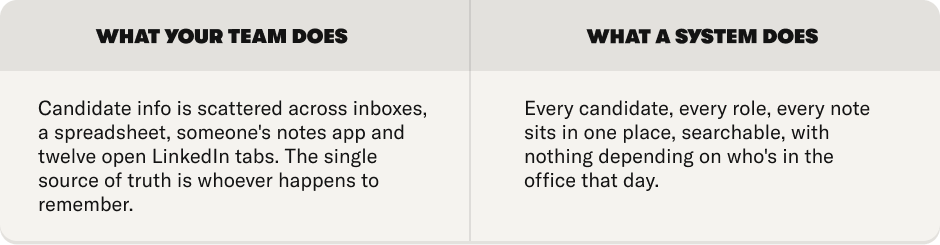
The tax: Information that lives in a person's head walks out the door when they're on holiday, or when they leave.
2. Being the reminder engine
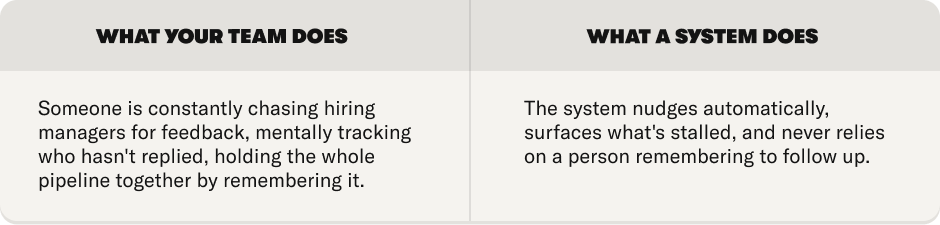
The tax: The strong candidate who goes cold because the chase didn't happen in time.
3. Being the scheduler
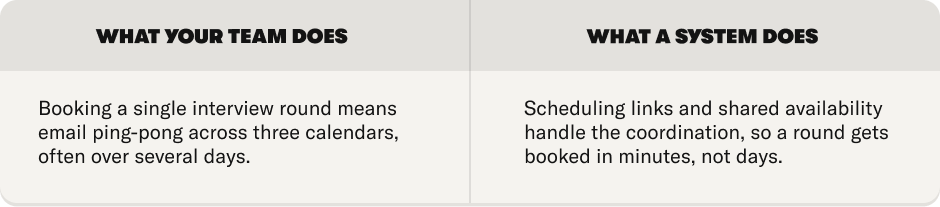
The tax: Days lost between stages, which is exactly where good candidates cool off.
4. Being the status report
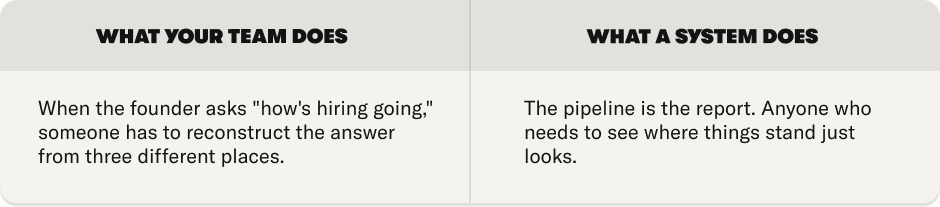
The tax: Hours a week spent answering "any update?" instead of actually hiring.
5. Being the consistency check
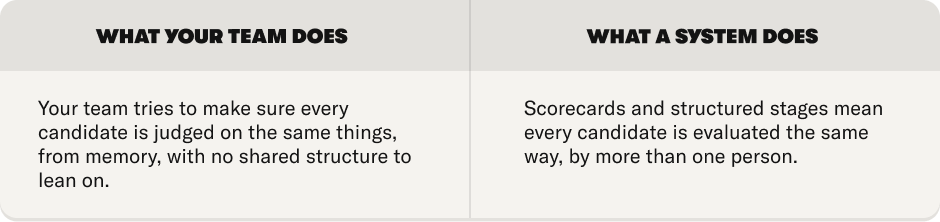
The tax: Inconsistent decisions, and the expensive mis-hires that quietly follow them.
6. Being the candidate experience
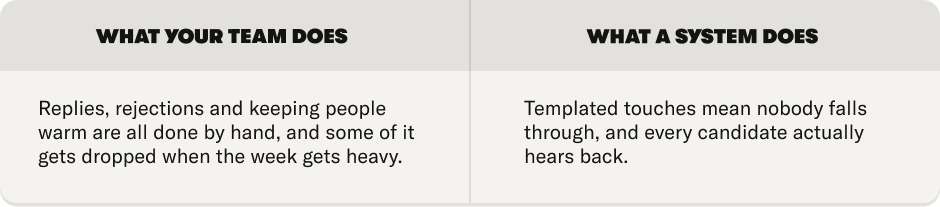
The tax: Silent rejections that quietly damage your employer brand for every future applicant.
7. Being the reporting layer
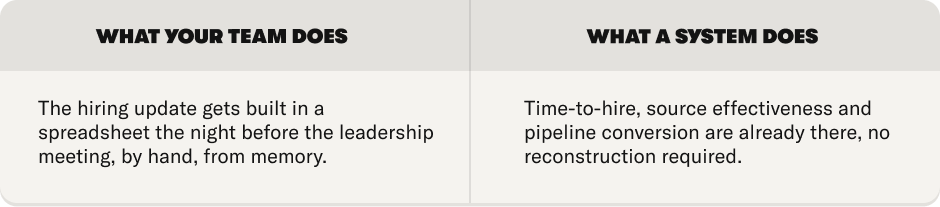
The tax: You can't improve what you're rebuilding from scratch every single month.
8. Being the compliance safeguard
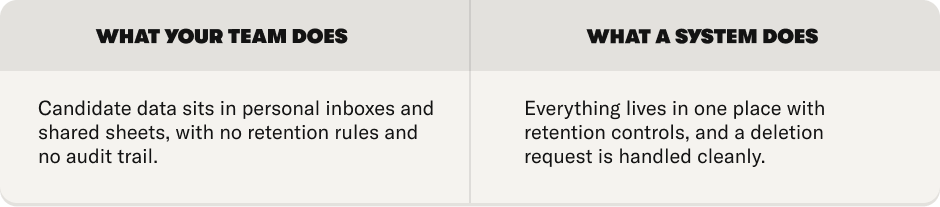
The tax: A GDPR risk that stays invisible right up until the moment it isn't.
Add them up
Eight jobs. Most scaling teams are carrying five or six of them without ever having decided to. This is the work an ATS like Homerun is built to take off your plate, so the team can go back to the part only people can do: actually hiring.
The wall
Every team can carry some of this by hand. The question is how many of the eight, and at what volume.
The wall isn't a headcount. It's not "50 people" or "100 people." It's the moment the manual system starts dropping things. A candidate ghosted by accident. A hiring manager who can't get a straight answer. A role that's been open 90 days because nobody noticed it had stalled.
You usually feel the wall before you can name it. Hiring starts to feel heavier than the number of roles would explain. The team is busy but things still slip. That feeling is the eight jobs piling up faster than people can carry them.
You've hit the wall when...
• You can't say, off the top of your head, what stage every candidate for your most important role is in.
• A candidate has gone silent in the last month and you genuinely don't know whether they dropped you or you dropped them.
• Someone asked for a hiring update this week and you had to go digging in three places to answer.
• A role has been open more than 60 days and you're not entirely sure why.
Be honest with yourself here
If two or more of those are true right now, the manual system is already leaking. The cost just hasn't landed on an invoice yet.
Score your team
Go back through the eight jobs. Count how many your team is currently doing by hand. Then find your number below.
0–2 jobs
Spreadsheets are probably still fine. You're small enough, or hiring rarely enough, that a system would be over-buying. Genuinely, don't rush it. Come back when you're hiring more.
3–5 jobs
You're at the wall. Your team is absorbing real cost, mostly in time and in the candidates that slip through. This is the point where most teams start looking, and it's the right time to look.
6–8 jobs
Your team isn't really hiring anymore. They're running a manual system, by hand, and it's almost certainly costing you more in their time and in missed hires than a tool ever would. This is overdue, not early.
What your number actually means
Whatever your number, the fix isn't "work harder" or "hire another coordinator." Adding people to a manual system just gives you a bigger manual system. The fix is to stop doing by hand the parts that were never meant to be manual. That's the whole case for an ATS, in one sentence.
What changes when the system does the work
This isn't about features. It's about what your team gets to stop doing, and what they get to start doing instead.
When a system is the database, the reminder engine, the scheduler and the reporting layer, your team stops being all of those things. The hours that went into coordination go back into the parts of hiring that actually need a human: talking to candidates, coaching hiring managers, making good calls.
That's the real reframe, and it's worth saying plainly. An ATS doesn't replace your recruitment team. It gives them their job back.
It's also, more or less, why we built Homerun. We kept meeting brilliant people teams who were spending their week being a manual database instead of recruiting, and it seemed like a solvable problem. Homerun takes the eight jobs in this guide off your team's plate and puts them in one place, so the people stay focused on the part only people can do.
One honest note
More on this in the last page, including who Homerun isn't right for. We'd rather tell you that now than waste your time later.
What changes when the system does the work
This isn't about features. It's about what your team gets to stop doing, and what they get to start doing instead.
When a system is the database, the reminder engine, the scheduler and the reporting layer, your team stops being all of those things. The hours that went into coordination go back into the parts of hiring that actually need a human: talking to candidates, coaching hiring managers, making good calls.
That's the real reframe, and it's worth saying plainly. An ATS doesn't replace your recruitment team. It gives them their job back.
It's also, more or less, why we built Homerun. We kept meeting brilliant people teams who were spending their week being a manual database instead of recruiting, and it seemed like a solvable problem. Homerun takes the eight jobs in this guide off your team's plate and puts them in one place, so the people stay focused on the part only people can do.
Where Homerun fits
We’re the team at Homerun. We built Homerun for scaling hiring teams who are done carrying the whole process by hand. The candidate database. The reminders. The scheduling. The feedback chase. The
reporting. All the little jobs that slowly turn recruitment into admin. Homerun brings those moving parts together in one clear, well-designed ATS that hiring managers actually want to use.
The honest version?
Homerun is a great fit for teams at companies of around 50 to 300 people, especially in Europe, who are hiring regularly and starting to feel the weight of doing it all manually. If you’re under 20 people and hire once in a while, spreadsheets might still be enough. No rush. We’d rather you come back when it actually starts to hurt. If you’re 500+ people, hiring globally, or dealing with heavy enterprise compliance, you’ll probably need something built for that scale. And we’d happily say that now rather than waste your time later.
But if your team is carrying five or more of the eight jobs in this guide by hand, it’s probably worth seeing what changes when the system does the work instead. We’ll look at your actual open roles and hiring needs, then show how Homerun could work for your team specifically. No canned demo. No pressure. Just a clear, practical look at whether Homerun makes sense for where you are.
The one question in this whole guide
Curious what Homerun could look like for your team?
Book a 25-minute walkthrough and we’ll show you how Homerun could work for your roles, your hiring flow and your team setup.
.webp)

.webp)